AI writing has an accent. You can hear it within a sentence or two: the tidy three-part lists, the “in today’s fast-paced world” openers, the paragraphs that all land at the same length, the closing line that begins “Ultimately.” None of it is wrong, exactly. It just sounds like nobody in particular.
The accent is measurable, too. Researchers who analyzed more than 15 million biomedical abstracts found that certain “style words” spiked so sharply after ChatGPT arrived that at least 13.5% of 2024 abstracts showed signs of being processed with large language models. Readers pick up on the same patterns, even when they can’t name them.
Most people try to fix the accent after the fact, by editing line by line or using AI to humanize text once the draft is done. That works, but it’s slow. A better place to start is the prompt itself. Change what you ask for, and you change what comes back. Here are
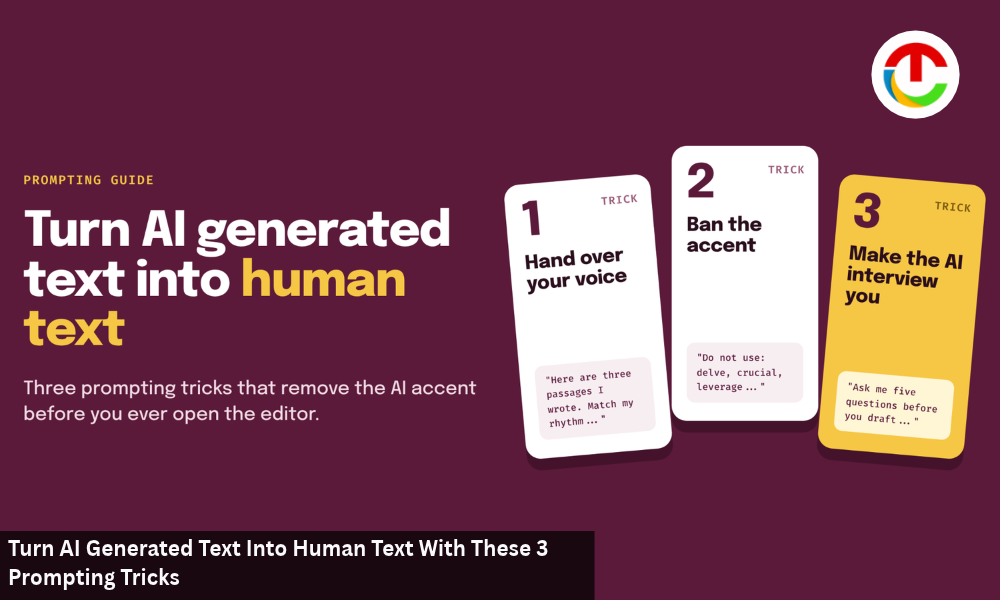
3 prompting tricks that turn AI generated text into human text before you ever open the editor.
Trick 1: Hand Over Your Voice
What it fixes: the “nobody in particular” problem.
When you ask an AI model to “write a blog post about remote work,” it writes in the average voice of every blog post it has ever seen. That average is exactly what sounds robotic. The fix is to give the model a specific voice to aim for, and the most reliable way to do that is to show the model an example instead of describing one.
Anthropic’s prompting guide makes the same point: examples are “one of the most reliable ways to steer Claude’s output format, tone, and structure,” and it recommends three to five of them. Adjectives like “friendly” or “professional” mean different things to different people. A sample of your actual writing means one thing.
Try this prompt:
Here are three short passages I wrote. Study the sentence length, word choice, how I open paragraphs, and how I use humor. Then write [your topic] in the same voice. Match my rhythm as well as my vocabulary. Don’t copy any phrases from the samples.
[Paste 150 to 300 words of your own writing for each sample]
Why it works: the model has something concrete to imitate, which is the fastest way to turn AI-generated text into human writing that sounds like you. Pick samples that show your range: one explanatory, one opinionated, one casual. If all three are formal, the output will be too.
Pro tip: keep a “voice file” with your best samples so you can paste it into any new chat in seconds.
Trick 2: Ban the Accent
What it fixes: the stock phrases and the metronome rhythm.\
Even with a voice sample, models drift back toward their favorite habits, and asking the AI to humanize text in general terms rarely fixes that. So tell them, explicitly, what not to do. A short “do not use” list removes the most recognizable tells, and a few rhythm rules break up the even, predictable sentence pattern.
Try this prompt:
Rewrite the draft below using these rules:
- Do not use these words or phrases: delve, crucial, leverage, seamless, robust, landscape, “in today’s world,” “it’s important to note,” “in conclusion,” “ultimately.”
- Vary sentence length. Include at least one sentence under six words in every paragraph.
- Use contractions where a person speaking would use them.
- Replace any general claim with a specific example, number, or name. If you don’t have one, write [EXAMPLE NEEDED] instead of inventing it.
- Don’t end with a summary of what you just said.
[Paste your draft]
Why it works: each rule targets a pattern readers notice, which makes this the most precise way to prompt AI to humanize text. Rule 4 is the quiet hero. It stops the model from padding paragraphs with vague statements, and the [EXAMPLE NEEDED] markers show you exactly where your own knowledge has to go.
Here’s the difference in a single paragraph.
Before: “In today’s fast-paced digital landscape, small businesses must leverage social media. Ultimately, a robust online presence can help drive engagement and growth.”
After: “Most small businesses don’t need five social platforms. They need one they’ll actually post on. A bakery with 400 loyal Instagram followers will sell more croissants than one with dormant accounts everywhere.”
Same idea. One sounds like a brochure. The other sounds like someone who has watched a bakery try.
Trick 3: Make the AI Interview You First
What it fixes: the missing human details that no prompt can invent.
The first two tricks change how the text sounds, but sound alone won’t fully turn AI generated text into human content. This one changes what it says. The biggest reason AI writing feels hollow is that it has no lived experience to draw on, so it fills the gaps with generalities. The fix is to flip the usual order: before the model writes anything, have it ask you questions.
Try this prompt:
I want to write a post about [topic] for [audience]. Before you draft anything, ask me five questions, one at a time, that will draw out my own experience, opinions, and specific examples. Focus on what surprised me, what I’d disagree with, and what I’ve seen go wrong. After I’ve answered all five, write the draft using my answers as the core material, in my words wherever possible.
Why it works: your answers become the raw material. Instead of “many businesses struggle with onboarding,” you get “our first three hires quit within a month, and every exit interview mentioned the same confusing first week.” That kind of detail is what makes writing feel human, and it can only come from you.
This trick takes ten extra minutes. It’s also the one that makes the biggest difference.
Stack the Tricks for the Best Results
Each trick works on its own, but they’re stronger together. A practical order looks like this:
- Interview first (Trick 3) to gather your real examples and opinions.
- Add your voice samples (Trick 1) when you ask for the draft.
- Run the ban list (Trick 2) as a second pass on whatever comes back.
Then read the result out loud. Even when you use AI to humanize text, your ear is the final test. You’ll still find a few lines that sound stiff, usually in transitions and introductions. Fix those by hand, or, for a long draft, run just those sections through a free AI humanizer and compare the result with your original before you keep anything.
What Prompts Can’t Do?
Prompting tricks are the cheapest way to turn AI generated text into human-sounding copy, but they have limits worth knowing.
They can’t verify facts. A model told to “use specific numbers” may produce specific wrong numbers. Check every statistic, name, and quote against a real source.
They can’t guarantee a detector result. Better prompts usually make text read more naturally, and that tends to lower AI scores, but no prompt makes text invisible to every checker. If you’re curious why, this explainer on what AI detectors actually measure breaks down the patterns they look for.
They can’t replace your judgment. The model can draft in your voice and dodge the obvious tells. It can’t decide what your piece should argue, which example matters most, or when a sentence is true but beside the point. That part is still yours.
The Short Version
If you want to turn AI generated text into human text, start before the first word is written. Show the model your voice, ban the phrases that give it away, and make it interview you so the draft has something real to say. Do those three things, and you’ll spend far less time editing out the accent and far more time writing what only you can write. That’s the smartest way to use AI to humanize text: as a partner that starts from your voice.
Also Read :- 10 Best Handwriting Recognition Software for Messy, Real-World Forms (2027)