An Instagram Story viewer helps you open Story content without learning every Instagram setting first. You can watch Stories inside Instagram or use a browser service built for public Story access. Before choosing, check whether the account is public and whether a Story is active. Then decide whether you want to use your own Instagram account. Those checks explain most differences a beginner will face.
What an Instagram Story Viewers Actually Does?
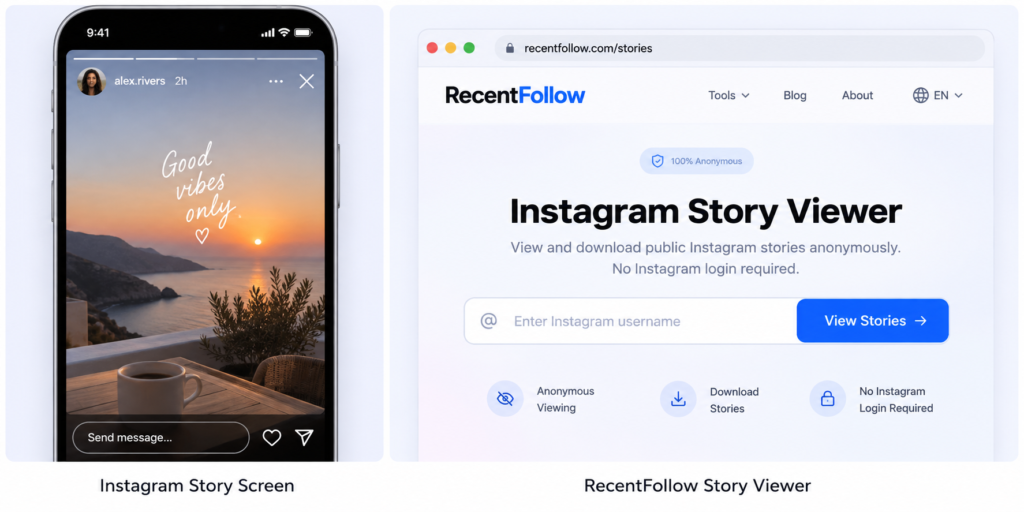
A Story viewer shows content available through a specific viewing route. Instagram is the native option, while external viewers usually focus on public Stories https://www.recentfollow.com/ has an anonymous Instagram Story Viewer that asks for a username and states that no Instagram login is required. RecentFollow presents it for public Story viewing, not for opening restricted content. A viewer does not change the privacy setting chosen by the account owner.
The word viewer can describe different experiences. One screen may open active Stories inside Instagram. Another may show public Stories in a browser without using your personal Instagram session. A separate viewer may focus on public Highlights after the original Story has expired.
A public profile does not make every Story available to everyone. Instagram lets people share Stories with a Close Friends list, which limits the audience to selected accounts. Private account access is restricted as well. You should treat claims about revealing every private or Close Friends Story with caution. Clear access limits are a better sign than impossible promises.
Timing matters too. Instagram Stories normally disappear after 24 hours unless the creator preserves selected content in another visible form, including Highlights. If a public viewer returns nothing, the account may have no active Story or the content may not be public. An empty result therefore does not prove that the viewer failed.
The Three Main Ways You Can Instagram Story Viewers
The first method is Instagram itself. You open a visible Story from your signed in account and watch it in the app or website. This route gives you the normal Instagram experience and any supported account interactions. Your viewing is connected to your Instagram identity. Choose it when anonymity is not important. Instagram’s Help Center states that the Story owner can tell when you have viewed a Story.
The second method is an anonymous Story viewer for public accounts. You enter a public username in a browser and check whether current Story content is available. RecentFollow says its Story Viewer works without an Instagram login and is intended for anonymous viewing of public Stories. This route is useful when you want public content without opening it through your own account.
The third method is a Highlight viewer. Highlights contain Story content the owner has chosen to keep visible after the original Story period. They are useful when no active Story exists but older public Story content remains on the profile. A Highlight is not a hidden archive because the owner decides what stays visible.
What You Can and Cannot See?
When a Story is available, you can see its photo or video plus the visible elements added to that Story. Some elements behave differently depending on where you open the content. Inside Instagram, your signed in account provides the native viewing experience. A public browser viewer may focus mainly on displaying the available Story media.
Some public viewers also offer downloads. RecentFollow states that its Story Viewer can download Story content to your device. Saving a file does not transfer ownership of that content. Instagram’s copyright guidance says users should avoid posting material that violates another person’s intellectual property rights. You still need to consider reuse rights after saving media.
Private Stories sit outside the normal scope of a public anonymous viewer. A private account requires Instagram access approved by the account owner. Close Friends Stories use an even narrower audience selected by the creator. A public viewer cannot remove those audience limits.
Expired Stories create another limit. Once a Story is no longer active, the same media may or may not remain public. The creator can keep selected Story content as a Highlight, while other material may disappear from public view. You therefore cannot assume a viewer will recover yesterday’s Story. Check public Highlights instead when older saved Story content matters.
Story viewing should also be separated from post viewing and follower activity. A Story viewer answers questions about active Stories or public Highlights. A post viewer deals with feed posts, reels, and carousels. A follower activity feature focuses on account connections rather than Story media.
A Simple Decision Path Before You Choose
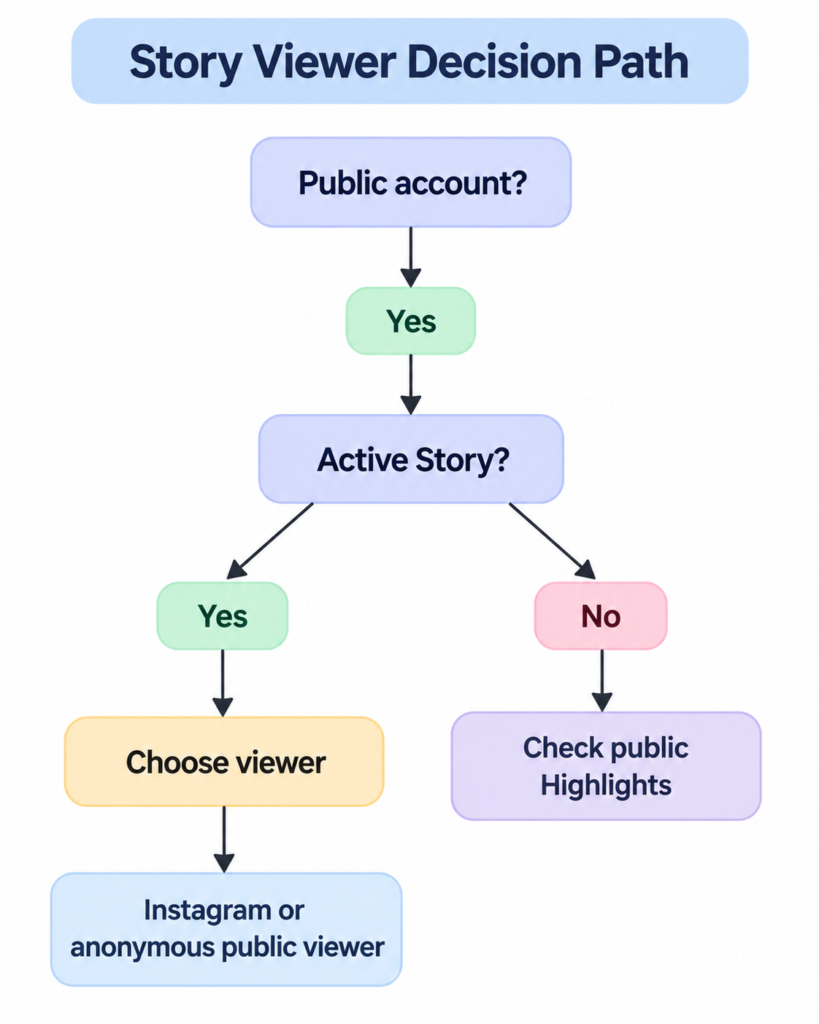
Start with visibility, then timing, then viewing preference. Ask whether the account is public. If it is public, check for an active Story and decide whether you want Instagram or an anonymous public viewer. If no active Story exists, check public Highlights when older saved content matters. If the account is private, use only access allowed by Instagram and the account owner. This order is more useful than comparing long feature lists first.
How to Choose the Right Viewer for Your Situation?
Choose Instagram when you want the full signed in experience, including supported replies or reactions. Choose an anonymous public Story viewer when the Story is public and you do not want to open it through your own account. Choose a Highlight viewer when the active Story is gone but selected Story content remains public. Do not choose a service because it claims to bypass private access. Match the stated access to the content you actually want to see.
The most useful beginner insight is that Story viewing is a sequence of three decisions. Visibility tells you whether the content can be reached publicly. Timing tells you whether you need an active Story or saved Story content. Identity tells you whether you want to view through your Instagram account or a public anonymous route. Once those questions are separate, feature comparisons become easier.
Read For More Information :- Instagram Services for Growing Reach Engagement and Followers